No SQL, no analyst
Is SQL still relevant for a data analyst? Yes. Even more, now that you no longer have to write it.
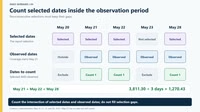
81 items in all · tick to narrow
Is SQL still relevant for a data analyst? Yes. Even more, now that you no longer have to write it.
Today is October 16. Microsoft deletes Whiteboard boards on personal accounts. No undo.
Still see yours? Export now. It may already be too late. https://whiteboard.sqlbi.com/export-microsoft-whiteboard.html
Already exported? The ZIP opens in SQLBI Whiteboard. Free, open source, 50 seconds below. Don’t trust me: Ctrl+F “October 16” on Microsoft’s page.
Tomorrow Microsoft deletes Whiteboard boards on personal accounts. No undo.
Tonight:
https://whiteboard.sqlbi.com/export-microsoft-whiteboard.html Don’t trust me: Ctrl+F “October 16” on Microsoft’s page.
Tomorrow.
On October 16, Microsoft deletes Whiteboard boards on personal accounts. No undo.
If you have boards you care about, here’s tonight’s checklist:
Step-by-step export: https://static.licdn.com/aero-v1/sc/h/al2o9zrvru7aqj8e1x2rzsrca
Still have doubts? Open Microsoft’s retirement page and Ctrl+F “October 16”: https://static.licdn.com/aero-v1/sc/h/al2o9zrvru7aqj8e1x2rzsrca
Work or school account? Your OneDrive boards stay in Teams and on the web, but the standalone app retires the same day. Forward this to the teacher, trainer, or relative who uses Whiteboard on a personal account.
(Full disclosure: SQLBI Whiteboard is our free tool, and it imports that ZIP: https://static.licdn.com/aero-v1/sc/h/al2o9zrvru7aqj8e1x2rzsrca)
2 days. Then Microsoft deletes Whiteboard boards on personal accounts.
60-second rescue: export the ZIP, open it in SQLBI Whiteboard. https://youtube.com/shorts/trr477ddYyU
Don’t trust me: Ctrl+F “October 16” on Microsoft’s page. https://support.microsoft.com/en-us/whiteboard/retirement-standalone-microsoft-whiteboard-apps
Two days left. On October 16, Microsoft deletes Whiteboard boards on personal accounts. No undo.
This short walks through the rescue: export the ZIP, import it, keep drawing. https://static.licdn.com/aero-v1/sc/h/al2o9zrvru7aqj8e1x2rzsrca
Don’t take my word for the date. Open Microsoft’s retirement page and Ctrl+F “October 16”: https://static.licdn.com/aero-v1/sc/h/al2o9zrvru7aqj8e1x2rzsrca
Step-by-step export: https://static.licdn.com/aero-v1/sc/h/al2o9zrvru7aqj8e1x2rzsrca
Work or school account? Your OneDrive boards stay in Teams and on the web. You can still try SQLBI Whiteboard.
(Full disclosure: SQLBI Whiteboard is our free tool, and it imports that ZIP: https://static.licdn.com/aero-v1/sc/h/al2o9zrvru7aqj8e1x2rzsrca)
3 days. Then Microsoft deletes Whiteboard boards on personal accounts.
Wrong answers only: how are you backing them up? I’ll start: a photo of my monitor.
Right answer: export the ZIP. https://whiteboard.sqlbi.com/export-microsoft-whiteboard.html Date check: Ctrl+F “October 16” on Microsoft’s page.
In three days, Microsoft deletes Whiteboard boards on personal accounts. Class diagrams, workshop sketches, meeting notes: gone, with no undo.
Wrong answers only: what’s your backup strategy?
I’ll start: “I took a photo of my monitor.”
The boring right answer: export the ZIP before October 16. https://static.licdn.com/aero-v1/sc/h/al2o9zrvru7aqj8e1x2rzsrca
Don’t take my word for the date. Open Microsoft’s retirement page and Ctrl+F “October 16”: https://static.licdn.com/aero-v1/sc/h/al2o9zrvru7aqj8e1x2rzsrca
Work or school account? Your OneDrive boards stay in Teams and on the web. But you can still play with the SQLBI Whiteboard!
(Full disclosure: SQLBI Whiteboard is our free tool, and it imports that ZIP: https://static.licdn.com/aero-v1/sc/h/al2o9zrvru7aqj8e1x2rzsrca)
Do early adopters win?
Fabric comes: Power BI is over. Conversational BI: Dashboards and reports are dead. Claude dashboards: Was conversational BI a thing?
Calm down.
As a professional, you want to stay up to date. As a company, FOMO bleeds money.
Be ready; don’t rush.
4 days. On Oct 16 Microsoft deletes Whiteboard boards on personal accounts. No undo. Export the ZIP today. Decide what to do with it later.
Don’t trust me: Ctrl+F “October 16” on Microsoft’s page. How to export: https://whiteboard.sqlbi.com/export-microsoft-whiteboard.html
Four days from now, your Microsoft Whiteboard boards may stop existing.
Personal Microsoft account: on October 16 the boards are permanently deleted. Editing already stopped on September 25. Work or school account: boards stored in OneDrive stay available in Teams and on the web, but the standalone app retires the same day.
Whatever you plan to do next, do one thing today: export your boards. A ZIP on your disk beats a promise in the cloud.
Don’t take my word for the date. Open Microsoft’s retirement page and Ctrl+F “October 16”: https://static.licdn.com/aero-v1/sc/h/al2o9zrvru7aqj8e1x2rzsrca
Step-by-step export guide: https://static.licdn.com/aero-v1/sc/h/al2o9zrvru7aqj8e1x2rzsrca
(Full disclosure: SQLBI Whiteboard is our free tool, and it imports that ZIP.)
Just because a tool or document calls something a best practice doesn’t mean it is.
I’ve seen a case like that, with a link to Microsoft documentation that doesn’t mention it at all. I don’t know whether it is a misinterpretation or a link found to justify a statement (the whole tool/document was clearly built with an agent, without proper assistance).
How do you assess the reputation of agentic sources?
Perfectly balanced, as all things should be. Microsoft destroys Microsoft Whiteboard for personal accounts and keeps it only for work and school accounts. However, you can still save your data: export your boards as ZIP by October 15, before they’re deleted the next day. Then import them into SQLBI Whiteboard and give them a second (better) life! 👉 SQLBI Whiteboard: https://whiteboard.sqlbi.com
And if you’ve never used a whiteboard, you should try our new app. It’s fun and powerful. Let me know if you try it for the first time!
There are two types of developers, hyper-logical and hyper-creative, who feel very differently about AI writing their code.
I would have attended this conference if I had been in Italy that week (I’ll be teaching DAX in Atlanta). Thus, if you want an excuse to visit, the conference is a good one; it’s free and interesting.
AI can explain DAX at any hour. It still can’t stand behind you, breathing down your neck while you write the measure. I can.
Three days of Mastering DAX in person: same course, same structure. This year we also spend some time on how DAX works with AI tools, because more and more DAX gets written that way, but you still need to know DAX to tell whether the result is right.
Hurry up, these are the last courses in 2026: 🇵🇱 Warsaw, October 12-14 https://www.sqlbi.com/p/mastering-dax-workshop-warsaw-oct-12-14-2026/ 🇨🇭 Lugano, October 27-29 https://www.sqlbi.com/p/mastering-dax-workshop-lugano-oct-27-29-2026/ 🇺🇸 Atlanta, November 9-11 https://www.sqlbi.com/p/mastering-dax-workshop-atlanta-november-9-11-2026/ 🇬🇧 London, November 24-26 https://www.sqlbi.com/p/mastering-dax-workshop-london-nov-24-26-2026/ 🇳🇱 Amsterdam, December 1-3 https://www.sqlbi.com/p/mastering-dax-workshop-amsterdam-dec-1-3-2026/
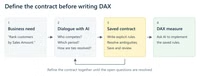
Defining the right contract is a key activity for a DAX developer using AI. In this article and video, we introduce the concept of a contract through simple examples.
https://www.sqlbi.com/articles/understanding-dax-contracts-when-using-ai/
#dax #ai
Seeking the truth, or pleasing the boss? Business as usual.
When you run an agent in Visual Studio (yes the big boy), it uses the debugger, watch expressions, just like a regular dude. It made all the tests green. It made my day.
Defining the right contract is a key activity for a DAX developer using AI. In this article, we introduce the concept of a contract through simple examples.
Very good considerations.
For the record, a refresh reloads the data. It shouldn’t refactor anything. Would you leave an agent alone with your model for a weekend? Wrong answers only
✨ Testing DAX Measures with AI If you change a measure and want to make sure it still works in every report, this might save you some time: let the AI create the tests nobody wants to write!
Watch the full video here: https://www.youtube.com/watch?v=qYQpl5Hjdk0
Is the world going to require more conductors than players? A reflection about AI-driven processes that goes beyond data analytics.
✨ Testing DAX Measures with AI If you change a measure and want to make sure it still works in every report, this might save you sometime: let the AI create the tests nobody wants to write!
If you use 𝗠𝗶𝗰𝗿𝗼𝘀𝗼𝗳𝘁 𝗪𝗵𝗶𝘁𝗲𝗯𝗼𝗮𝗿𝗱 with a personal account, remember to 𝗲𝘅𝗽𝗼𝗿𝘁 𝘆𝗼𝘂𝗿 𝗯𝗼𝗮𝗿𝗱𝘀 𝗯𝗲𝗳𝗼𝗿𝗲 𝗢𝗰𝘁𝗼𝗯𝗲𝗿 𝟭𝟲, because after that date you will no longer be able to access your data! Export each board as a ZIP now! Instructions: https://static.licdn.com/aero-v1/sc/h/al2o9zrvru7aqj8e1x2rzsrca The 𝗴𝗼𝗼𝗱 𝗻𝗲𝘄𝘀 is that you can now 𝗶𝗺𝗽𝗼𝗿𝘁 that ZIP into SQLBI Whiteboard (version 1.7 or later). 𝗦𝗤𝗟𝗕𝗜 𝗪𝗵𝗶𝘁𝗲𝗯𝗼𝗮𝗿𝗱 opens it as a file on your PC: 𝗳𝗿𝗲𝗲 and open source. What started as an internal project is now becoming a full replacement for Microsoft Whiteboard, excluding real-time collaboration (for now?). Don’t hesitate to post bugs and suggestions: 𝘁𝗵𝗲 𝘁𝗼𝗼𝗹 𝗶𝘀 𝗲𝘃𝗼𝗹𝘃𝗶𝗻𝗴 very quickly. Download the latest version here: https://static.licdn.com/aero-v1/sc/h/al2o9zrvru7aqj8e1x2rzsrca
If you use Microsoft Whiteboard with a personal account, remember to export your boards before October 16, because after that date you will no longer be able to access your data! Export each board as a ZIP now! …
The first one goes down on its own. The second one is why we made the “DAX with AI” course. https://www.sqlbi.com/campaign/dax-with-ai-courses-launch/
How many pills are you willing to take?
Retro Data · Online
Are there still people writing meaningful articles/blog posts?
I try to monitor what’s being published in the semantic models/Power BI space (for the News section of the SQLBI newsletter). In the last few months, more and more articles in the “blog” section of a company (I mean, many companies!) have been completely useless. I want to give free suggestions since they paid some SEO expert for bad advice:
Hey, I could be wrong! If you have an explanation for why slop content can help a company, I’d be glad to hear it.
On October 16, Microsoft will delete the legacy boards from Microsoft Whiteboard, which will be retired from personal accounts. (That’s 22 days from today!)
If your boards live in a personal account, your window is even shorter: starting tomorrow, September 25, those accounts go read-only. Whatever you planned to save, save it within the next week.
How to export (see the picture below):
Only the ZIP format has all the details you can use for future import. Moreover, you get an HTML format that renders well in a browser without requiring any additional app.
We built SQLBI Whiteboard because we teach with a whiteboard every week and didn’t want to lose the tool. It’s free, open-source, and runs offline on Windows.
Export your existing boards first, so you don’t lose your data. Soon, you will be able to import your exported Microsoft Whiteboard files into SQLBI Whiteboard (We are still working on it!)
You can get a taste of the new app if you want (import will be implemented soon):
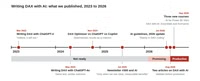
The time has come: in 2026, 𝘂𝘀𝗶𝗻𝗴 𝗔𝗜 𝘁𝗼 𝘄𝗿𝗶𝘁𝗲 𝗗𝗔𝗫 𝗵𝗮𝘀 𝘀𝘁𝗮𝗿𝘁𝗲𝗱 𝘁𝗼 𝗯𝗲 𝗲𝗳𝗳𝗲𝗰𝘁𝗶𝘃𝗲.
We also created three new video courses that should not become obsolete in two weeks! 𝗔𝗜 𝗳𝗼𝗿 𝗣𝗼𝘄𝗲𝗿 𝗕𝗜: 𝗜𝗻𝘁𝗿𝗼 (𝗳𝗿𝗲𝗲!) 𝗗𝗔𝗫 𝘄𝗶𝘁𝗵 𝗔𝗜: 𝗘𝘀𝘀𝗲𝗻𝘁𝗶𝗮𝗹𝘀 𝗗𝗔𝗫 𝘄𝗶𝘁𝗵 𝗔𝗜: 𝗦𝗰𝗲𝗻𝗮𝗿𝗶𝗼𝘀
We have a page dedicated to AI for Power BI and DAX, where you can also find the link to these courses: https://www.sqlbi.com/ai/
I wrote a long post to recap what has changed between 2023 and 2026, and trying to answer many questions I expect to receive: https://www.sqlbi.com/blog/marco/2026/09/22/where-we-stand-on-ai-and-dax-in-2026/
I am looking forward to receiving all types of comments! 🙂
The time has come: in 2026, using AI to write DAX has started to be effective.
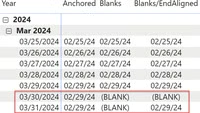
A simple daily average can mask complexity that isn’t immediately apparent. In this article and video, we explore several edge-case scenarios to meet different requirements, using AI to speed up development.
https://static.licdn.com/aero-v1/sc/h/al2o9zrvru7aqj8e1x2rzsrca
#dax #powerbi
I promise, I will not touch the code anymore.
The time has come: in 2026, using AI to write DAX has started to be effective. Let me recap what has changed between 2023 and 2026, and what we are doing with our three new courses to best assist you…
I have a free online session about VertiPaq on Saturday, September 26, 10:00 UTC (11:00am GMT, 12:00pm CEST, 6:00am EST). If you think Direct Lake is the new kid in town, well, internally it’s always VertiPaq after transcoding… so… no excuses!
Agenda/registration at https://retrodata.live/
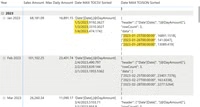
A simple daily average masks a level of complexity that may not be immediately apparent. In this article, we use AI to create a daily average, and then to analyze several edge-case scenarios to build a sound calculation.
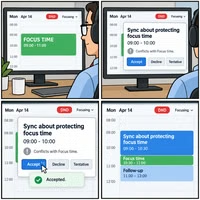
Good news, everyone. The meeting about protecting focus time was well attended.
Do you need focus time to focus on your focus time?
Wrong answers only!
10% error on Facebook Likes and everybody’s happy; 0.1% on your financial data and you’re paying a fine (or worse!)
When you receive data, some of the assumptions you make about it are broken. You can accept it, you drop it, or you write a report about what’s wrong: all three can be the right answer.
I picked two extremes to make the point; most work sits in the middle, where you can live with lower quality, but you have to know you’re accepting it.
Watch the full webinar: https://youtu.be/qtnLNZFRZ84
DAX evolves, and the in-person course you can take this Fall isn’t the same as what we taught four years ago. Not every new DAX function makes the cut; the course can’t grow forever, so something new has to push something else out. This year, the new thing is AI for model authoring, and yes, we’ll look at AI tools to write DAX: ChatGPT, Claude, Gemini, Grok, Copilot… All these tools require the same approach to get what you need and not just something that seems to work. Knowing DAX is still very helpful and productive!
The last five dates in 2026 for the Mastering DAX Workshop:
🇵🇱 Warsaw, October 12-14 https://www.sqlbi.com/p/mastering-dax-workshop-warsaw-oct-12-14-2026/ 🇨🇭 Lugano, October 27-29 https://www.sqlbi.com/p/mastering-dax-workshop-lugano-oct-27-29-2026/ 🇺🇸 Atlanta, November 9-11 https://www.sqlbi.com/p/mastering-dax-workshop-atlanta-november-9-11-2026/ 🇬🇧 London, November 24-26 https://www.sqlbi.com/p/mastering-dax-workshop-london-nov-24-26-2026/ 🇳🇱 Amsterdam, December 1-3 https://www.sqlbi.com/p/mastering-dax-workshop-amsterdam-dec-1-3-2026/
A DAX calculation can produce convincing values at the detail level and fail at the total. The problem is often that the business rule was evaluated at the wrong granularity. This article+video introduces four grains, or levels of granularity, that should be identified before writing your DAX formula.
https://static.licdn.com/aero-v1/sc/h/al2o9zrvru7aqj8e1x2rzsrca
#dax #powerbi
If you teach/demo… Prepare a presentation for SQLBI Whiteboard:
There is also an export to PDF/PPTX, but that’s a topic for another day. https://static.licdn.com/aero-v1/sc/h/al2o9zrvru7aqj8e1x2rzsrca Microsoft Store: https://static.licdn.com/aero-v1/sc/h/al2o9zrvru7aqj8e1x2rzsrca GitHub: https://static.licdn.com/aero-v1/sc/h/al2o9zrvru7aqj8e1x2rzsrca
Overloaded with unnecessary meetings. Just do the damn thing!
A DAX calculation can produce convincing values at the detail level and still fail at the total. The problem is often not the total itself: the business rule was evaluated at the wrong granularity. This article introduces four grains, or levels of granularity, that should be identified before writing your DAX formula.
Many-to-many relationships are valid in Power BI, so are bidirectional filters. However, they’re not considered best practice, which is different.
A best practice in Power BI is what you do by default when you have no reason to make an exception. It’s a suggestion, not a principle.
Isn’t it the same in other domains?
CTRL+V: paste DAX code F6: Format it Highlight the code and teach. It also works with SQL. Interested in other languages?
SQLBI Whiteboard is free and open source.
https://whiteboard.sqlbi.com · Microsoft Store: https://apps.microsoft.com/detail/9NN5N0L2TMTF · GitHub: https://github.com/sql-bi/SQLBI-Whiteboard
A new episode of “The Whiteboard” series, where I talk about matrix totals in Power BI. Special guest: the SQLBI Whiteboard!
#powerbi #dax #whiteboard
Do you think Direct Lake is the future? It’s all about VertiPaq after transcoding!
Join my free session on VertiPaq: Sept 26, 10:00 UTC. No excuses! Register now: https://retrodata.live/
#VertiPaq
SUMX ( Customer, ... ) looks safe. In my demo, it loses over 20% of the revenues. Fair enough; we made a dramatic demo to get that!
Let's talk about matrix totals in this episode of The Whiteboard! Special guest: the SQLBI Whiteboard!
SUMX ( Customer, … ) looks safe. In my demo, it loses over 20% of the revenue. Fair enough; we made a dramatic demo to get that!
The blank row DAX adds for the orphan transactions isn’t in a table reference, so the iterator never sees that money. VALUES ( Customer ) brings it back. With MAXX, do the opposite.
Watch the full video here: https://youtu.be/anSUtRETJUo?si=qsJNoU8rko8WHeT1
Your report. Live. On a whiteboard.
This is LiveView in SQLBI Whiteboard: capture any running window onto the canvas.
Your Power BI report is there, updating live. You can freeze the frame and draw over it. Or draw while it’s changing, if you want!
No screenshots, no window switching, no “let me share my other screen.” You can use any window, not just Power BI.
https://whiteboard.sqlbi.com · Microsoft Store: https://apps.microsoft.com/detail/9NN5N0L2TMTF · GitHub: https://github.com/sql-bi/SQLBI-Whiteboard
A yet-unpredicted side effect of agent coding could be a resurgence of client software over web apps. It’s still early to say, but I’m starting to see more signs of that.
PS after a few comments: “client software” means software designed to run locally, also without an internet connection. Forget the data analytics world; I’m talking in general.
I exhausted tokens configuring the Moonlight client on Windows to get a good client user experience for Omarchy running in a Docker container on another box. It was worth the effort! At the next reset, I’ll ask to write up some documentation on this insane architecture (btw, Tailscale is in the loop in case I connect outside this LAN).
@dhh, is there a repo that serves as a knowledge base or something similar? I didn’t find any info in the manual.
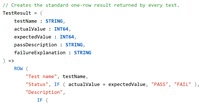
This article describes how to use AI to identify relevant test cases in a semantic model and create repeatable DAX tests for a measure.
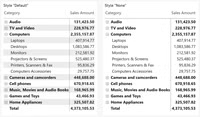
Microsoft recently introduced a new default visual design style for Power BI named Fluent 2. I personally disagree with a few choices in the new defaults, including the removal of alternating row colors from Table and Matrix visuals. However…
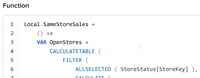
Code written by AI can contain many duplicate parts. User-defined functions are a great tool to simplify complex measures; this article shows how to leverage AI to build better DAX code.
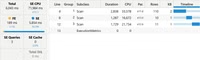
Visual calculations can either improve or degrade the performance of a report. In this article, we outline how we ensure visual calculations have a positive impact on performance.
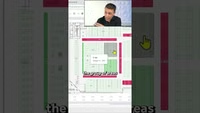
One area returns 45% margin. The one next to it returns 16%. A table would never tell you, because a table doesn't know where the shelf is.
Synoptic Designer 2.0 is now live!
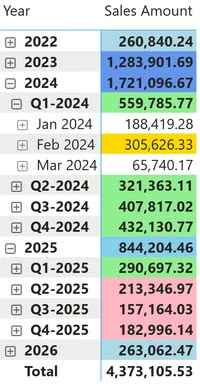
This article describes how to apply different formatting rules at each level of a hierarchy (one rule at the year level, another at the quarter level, another at the month level) using ISINSCOPE in a measure or ISATLEVEL…
The question that comes up every time someone puts a hierarchy in a matrix.
3 years ago, we wrote our “Generative AI guidelines at SQLBI”. We think it’s time to update them. Over the past 3 years, the world has changed: it is simply no longer possible to avoid using generative AI services…
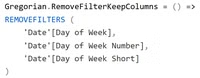
In this article, we implement a function that removes filter-keep column filters from a calendar, using REMOVEFILTERS as the return value of the function.
A container ship carries thousands of units. One of them has a maintenance problem. Where is it, exactly?
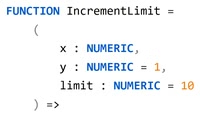
This article describes how to define optional parameters in DAX user-defined functions and set default values for parameters not specified by the caller.
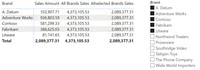
DAX offers many functions to remove filters from the filter context. In this article, we analyze the differences among the most commonly-used functions.
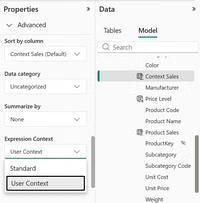
This article describes the new Expression Context property of calculated columns in Power BI, explaining how user-aware calculated columns work, why they are not materialized, and how to use them as virtual calculated columns for localization and custom security scenarios.
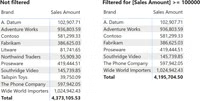
A slicer cannot filter a measure. In this article, we analyze this common request by explaining how to use a slicer to filter a measure, after discussing the real meaning of using a measure with a slicer.
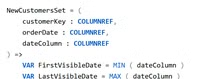
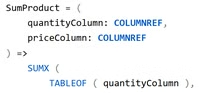
This article describes the parameter types available in DAX user-defined functions, focusing on the specialized reference types MEASUREREF, COLUMNREF, TABLEREF, and CALENDARREF.
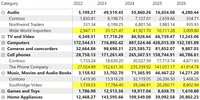
Visual calculations can be used efficiently to format visuals. This article presents an interesting technique to highlight a row based solely on the maximum value in the last column.
We released a new session in SQLBI+: How to navigate the lattice of visual calculations: This video explains how to navigate the lattice of visual calculations in DAX, using COLLAPSEALL and EXPAND to move between levels. A key topic…
Alberto and I recorded an unplugged session to talk about the new edition of the Mastering DAX Video Course. You can watch it above, but if you prefer a quick read, here are some thoughts. The question we heard…
This article describes the different roles of user-defined functions and calculation groups, explaining when to use either, and how they complement each other in the design of a semantic model.
The third edition of the Mastering DAX video course is available!
This article offers a comprehensive guide to changing the like-for-like pattern into model-independent functions to enhance flexibility and simplify DAX code.
We released a new course for SQLBI+ subscribers: Understanding Visual Calculations in DAX. This is not an introduction to visual calculations for users. The goal is to explain the details of implementing visual calculations for experienced DAX developers, including new…
This article describes how to use the TOJSON and TOCSV functions to inspect the content of intermediate table variables when debugging a DAX measure.
The new calendar-based time intelligence functions offer greater flexibility than the classic time intelligence functions. This article describes the DATEADD parameters for controlling different granularity shifts.
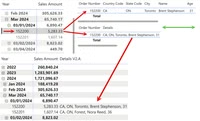
This article shows how to create a DAX measure that displays information from multiple columns in a business entity or transaction, into a single column of a matrix.
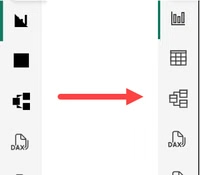
In mid-January 2026, many Power BI Desktop users began noticing a strange visual regression: several icons in the interface—including the Data, Model, and DAX icons—appeared as solid black shapes instead of their normal outlines. The issue appeared suddenly, even…
Nothing here with these filters. Short posts are held back unless + Short is ticked.