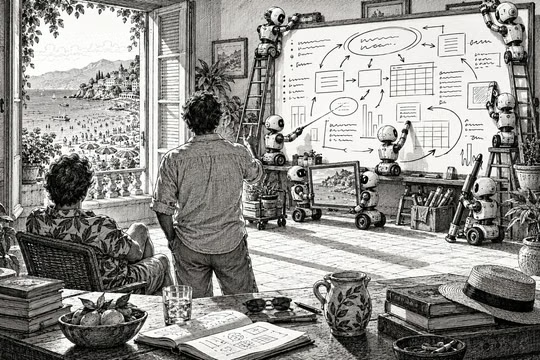
On August 14, 2026, Alberto sent me an email: “An evening of work. That’s all I needed to get rid of Microsoft.” He didn’t mean it. Below there is a picture drawn with the prototype of a whiteboard app he had started a few hours earlier.
A few days before, Microsoft Whiteboard had started showing a dialog box when it opened: the app would be retired on September 14, 2026. We were in the middle of recording a new video course, DAX with AI: Essentials, with another one, DAX with AI: Scenarios, due shortly after. We used Microsoft Whiteboard every day for our recordings. Alberto decided that we needed only a few of its features, and he started vibe coding a replacement with Codex. His prototype had a fraction of the features of the Microsoft product, but almost all of the features we needed, plus a few shortcuts he had always wanted.
If all we needed was a way to finish the courses, the story would end there. However, three things combined to change its direction.
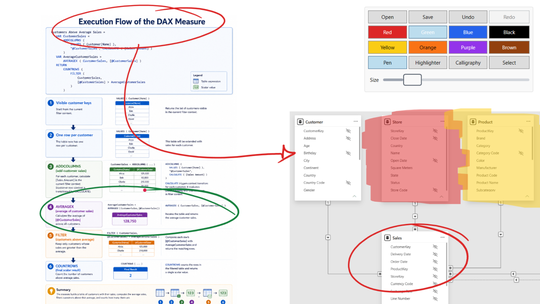
First, drawing on a whiteboard, on notes, and on screenshots was already an established teaching tool in our videos, and we wanted to bring it to in-person teaching too: classroom courses and conferences. For that, we needed something reliable that is easy to install and upgrade, not something that is hard to configure.
Second, it looked like a good way to start a greenfield project and play with AI coding tools. We used many different tools from many different vendors, learning the small differences and similarities. (Hint: there is no single winner, and every two or three weeks you may review your decisions and change your mind.)
Third, and most important: it was mid-August. Many of you may not know that in Italy, August 15 is Ferragosto, a public holiday when everybody is supposed to be on vacation, or working in one of the services that keep the vacations running. Cities become ghost towns, and beaches and mountains are packed. For nerds who enjoy a life behind a screen, this is the best or the worst day of the year, depending on whether friends and family drag you into the crowded routine or leave you free to do what you like without anyone breaking your flow. By coincidence, this year Alberto and I were both in the second group. So, game on. We had a new toy, no pressure to deliver (we were supposed to be on vacation, after all), and a new world to explore. The answer to any idea, feature request, or possible extension was always the same: why not?
Along the way, we realized that the retirement mainly hit personal accounts: with a work account, our boards would stay available in Teams and on the web. By then, it didn’t matter anymore.
Why not?
The first decision was to make SQLBI Whiteboard public, free, and open source. We never expected any contributions. It was simply a push to keep a decent quality level, so that we would not be embarrassed, and a guarantee that the app would always be available, whenever and wherever we needed it. Our goal was a whiteboard specifically for teaching: highlighting elements in existing material, without many of the features that help you create schemas and diagrams from scratch. Shortly after, we realized that other people might have the same requirements. Therefore, we needed a website, decent documentation, and a very easy way to install and upgrade the app.
Some things were harder than expected: we struggled to get the laser pointer and the pen pressure to behave the way we wanted. Other problems that would have required days turned out to be relatively easy. Publishing the app on the Microsoft Store and on winget was handled almost entirely by agents, without much intervention on our side, apart from waiting for the approval process of both channels.
Up to that point, I had not pushed the boundaries much. I was executing engineering steps that had always been too expensive and boring to even consider for other tools I built in the past: for example, Bravo for Power BI is still not on the Microsoft Store (of course, we’ll do that in the next release!). Meanwhile, Alberto had crazy ideas, and he just tried to see what happened when he raised the bar.
In Code as a hobby, I described two kinds of developers: those who love the code and those who love the product. I didn’t plan it, but on this project I was taking care of the engineering, while Alberto was chasing the product.
I would never have started coding such a feature by hand.
This is how LiveView was born. It started from a simple need: copying a screenshot of an app into the whiteboard to draw on it, without losing the strokes when you move to something else, as happens with ZoomIt. We ended up with a full live view of any other window or screen inside a rectangle of the whiteboard! To be honest, I would never have started coding such a feature by hand: the cost was out of all proportion to the benefit, and the improvement over a static screenshot seemed marginal. Today, I cannot imagine how we lived so many years without it.
We have always added features faster than we fixed bugs, probably because of the possible regressions and the limited number of tests you can write for a tool that is mostly interactive user interface.
After LiveView, one of the wow moments was creating the website. The guide page is something I would never have built with a human designer. Not because of the quality of the animated SVGs, but because of the number of changes we requested after the first draft of many visualizations. I would have felt guilty asking that of a volunteer contributing to an open-source project, and nobody would ever have justified the cost of a professional designer for it. Curiously, it was (and still is) harder to control the English style of a single page than the graphic style of many different visualizations.
Once we reached “feature complete” for our own requirements, we thought the app could help other users of Microsoft Whiteboard, so we planned a campaign around the September 14 deadline. What happened on the morning we were ready to launch the app in public? Microsoft moved the deadline to October 16! However, our agents didn’t complain about having to fix all the graphics that were ready to be published.
With more time available, and with feedback from early adopters, we added support for mouse-only input and export to PDF and PPTX (because students of our video courses wanted to open a file without downloading a custom app). Then we started working on feature parity with Microsoft Whiteboard, so that SQLBI Whiteboard could import any file exported by Microsoft Whiteboard.
This led to another wow moment. We didn’t have enough samples for all the object types, so the agent created a list of the entities we should test, and of the files we needed to test the import feature. Looking at that list, I imagined an afternoon and a night spent creating test files, so I asked the agent to do the job for me, and it did. It spent a few hours on my laptop, creating objects in Microsoft Whiteboard and exporting the files it produced. I admit that I am not sure SQLBI Whiteboard can import every board created with Microsoft Whiteboard. We had to fix a few bugs, and I imagine there are others… but the quality I have seen so far is solid.
That is the story. If you are curious about the details, the repository is public, and you can follow every commit to see how the product evolved. The app itself is at whiteboard.sqlbi.com.
The cost of technical debt dropped by orders of magnitude.
The development experience of SQLBI Whiteboard completely redefined my expectations for internal tools and side projects.
In the past, most decisions were driven by the technical debt accumulated during development. Which features to implement, which libraries to include: most of the answers were automatic, because the cost of a different decision was simply too high. Now, the cost of technical debt is lower by orders of magnitude.
Paradoxically, I spend more time planning and evaluating options than before, but no choice is final anymore. I think more about what to build, and less about protecting the code from a future I cannot predict. This does not justify bad decisions, but we don’t have to think too far ahead to choose an architecture for future extensions. As a side effect, this also reduces the risk of overengineering.
The new MVP
Many lessons learned, a product shipped, and a maintenance cost that is absolutely affordable. One thought: is an MVP, a minimum viable product, still required? I don’t think so.
Someone will object that an MVP is not only about saving the cost of features nobody wants: it is about learning what users want before you invest too much. Fair. Indeed, we made changes based on the feedback received from our early adopters: mouse input and PPTX export are features based on that. But that feedback arrived on a product that was already worth adopting, and adding these features they required was inexpensive. The feedback is still required. What changed is the minimum.
We could keep the acronym and change its meaning: maximum valuable product. The first version should provide the maximum number of reasons to adopt it, not the minimum. And with that, my tolerance for companies shipping unfinished or unusable products has dropped, too. There are no excuses anymore.
Maximum valuable product.